The Problem
Unreal Engine ships with Steam Input by default, however this implementation is effectively abandoned and severely outdated. The implementation relies on the deprecated input system to map Steam Input Actions to existing input keys, not only has this the risk of causing conflicts with other input methods, it also adds additional steps to the whole system that add unnecessary dependency to a deprecated system. To add a new Steam Input Action to unreal engine, you have to create an input mapping using the deprecated system, setting the name of the mapping to the name of the input action, and the key to the key event that needs to be send. So for example having a mapping named “Shoot” with the key set to “Left_Mouse” will make it so that any time a Steam Input Action with the ID “Shoot” get’s send it will trigger the “Left_Mouse” event to fire. Additionally under the hood the plugin takes a very naive approach to mapping the controller to User’s, it maps devices to user’s based on the order they get reported by steam, this means that if a device disconnects or Steam suddenly changes the order, the user’s will suddenly have different controllers assigned to them.
The Solution
The Steam Input API aims to solve these issues and extend support to handle the full feature set of the Steam Input API. Instead of mapping actions to existing buttons, this plugin will create and manage custom keys that can be directly used by any system that handles input to listen directly to the Steam Input Action, no in-between translation, no risk of conflicting inputs. The plugin also takes extra care to ensure that controller registration is consistent and won’t change based on other controllers disconnecting. On top of a stable and modern implementation of input handling, the plugin also provides a blueprint accessible interface for nearly every Steam Input API feature. Allowing for polling of button information, and control over the active input action mapping. Additionally it also brings some new features, A helpful debugging panel for seeing what actions are currently active and the button states they are currently in, as well as a widget that will display the correct glyph for the physical button that would need to be pressed to activate the input action.
The implementation
The first challenge to solve was that of the ID mapping, for this I referenced the XBOX controller implementation and ended up with a system that will track a controller’s connection state across frames. If a controller get’s disconnected the system will send button events setting every input key to their neutral state.
void FSteamInputController::UpdateControllerState(const InputHandle_t* ConnectedControllers, const int32 Count)
{
  //remove controllers that have been disconnected for more than 1 frame, and mark connected controllers as disconnected
  for (auto It = ControllerStates.CreateIterator(); It; ++It)
  {
    switch (It.Value().ConnectionState)
    {
    case FControllerState::Reconnect:
    case FControllerState::Connected:
      {
        It.Value().ConnectionState = FControllerState::Disconnected;
        break;
      }
    case FControllerState::Disconnected:
      {
        It.RemoveCurrent();
        continue;
      }
    }
  }

  //mark currently connected controllers as connected.
  for (int i = 0; i < Count; ++i)
  {
    //if the controller is already in the list, just mark it as connected, otherwise mark it as a new (re)connection
    if (const auto ControllerState = ControllerStates.Find(ConnectedControllers[i]))
    {
      ControllerState->ConnectionState = FControllerState::Connected;
    }
    else
    {
      ControllerStates.Add(ConnectedControllers[i]).ConnectionState = FControllerState::Reconnect;
    }
  }
}
The above function will run once per frame and compare the controller state with the previous frame, it will update the state accordingly which is then used to send the proper events.
void FSteamInputController::GetPlatformUserAndDevice(const FInputHandle InputHandle, FPlatformUserId& OutUserID,
                                                     FInputDeviceId& OutDeviceId)
{
  OutDeviceId = USteamInputFunctionLibrary::DeviceMappings.GetOrCreateDeviceId(InputHandle);

  IPlatformInputDeviceMapper& DeviceMapper = IPlatformInputDeviceMapper::Get();

  if (auto ControllerState = ControllerStates.Find(InputHandle))
  {
    switch (ControllerState->ConnectionState)
    {
    case FControllerState::Reconnect:
      {
        OutUserID = DeviceMapper.GetPlatformUserForNewlyConnectedDevice();
        DeviceMapper.Internal_MapInputDeviceToUser(OutDeviceId, OutUserID, EInputDeviceConnectionState::Connected);
        break;
      }
    case FControllerState::Disconnected:
      {
        OutUserID = DeviceMapper.GetUserForUnpairedInputDevices();
        break;
      }
    default:
      {
        OutUserID = DeviceMapper.GetUserForInputDevice(OutDeviceId);
      }
    }
  }
}
The above function handles assignment and querying of the Device and user ID’s based on the input handle, this is then used by Unreal engine to identify the controller and send the events only to the users that should receive them.
On top of providing a more modern implementation of the already existing plugin, the Steam Input API plugin also provides hooks for blueprints to interact with the Steamworks API directly
class STEAMINPUT_API USteamInputFunctionLibrary : public UBlueprintFunctionLibrary
{
public:
  /// Push an action set layer by name to the provided controller. This will put the layer at the top of the list even if it was already in the list
  /// @param ControllerHandle Device ID of the steam controller you want to push the action set layer to
  /// @param Name Name of the action set layer to push
  UFUNCTION(BlueprintCallable, Category = "Steam|Input|Action|Layers")
  static void PushActionLayerByName(FInputDeviceId ControllerHandle, FName Name);
  /// Push an action set layer by ID to the provided controller. This will put the layer at the top of the list even if it was already in the list
  /// @param ControllerHandle Device ID of the steam controller you want to push the action set layer to
  /// @param Handle Action set handle of the layer to push
  UFUNCTION(BlueprintCallable, Category = "Steam|Input|Action|Layers")
  static void PushActionLayer(FInputDeviceId ControllerHandle, FInputActionSetHandle Handle);

  /// Remove an action set layer by name from the provided controller.
  /// @param ControllerHandle Device ID of the steam controller you want to remove the layer from
  /// @param Name name of the action set layer to remove
  UFUNCTION(BlueprintCallable, Category = "Steam|Input|Action|Layers")
  static void RemoveActionLayerByName(FInputDeviceId ControllerHandle, FName Name);
  /// Remove an action set layer by ID from the provided controller.
  /// @param ControllerHandle Device ID of the steam controller you want to remove the layer from
  /// @param Handle Action set handle of the action set layer to remove
  UFUNCTION(BlueprintCallable, Category = "Steam|Input|Action|Layers")
  static void RemoveActionLayer(FInputDeviceId ControllerHandle, FInputActionSetHandle Handle);

  /// Get a list of the active layers for the controller
  /// @param ControllerHandle Device ID of the steam controller you want to get the layers from
  /// @return Array containing all the layers that are active on the controller
  static TArray<InputActionSetHandle_t>* GetActionLayersForController(FInputDeviceId ControllerHandle);

  /// Get the active action set for the controller
  /// @param ControllerHandle Device ID of the steam controller to get the active action set from
  /// @return The active action set for the controller
  UFUNCTION(BlueprintCallable, Category = "Steam|Input|Action|Set")
  static FInputActionSetHandle GetActionSetForController(FInputDeviceId ControllerHandle);

  /// Activate an action set by name for the controller
  /// @param ControllerHandle The controller to activate the action set for
  /// @param HandleName Name of the action set to activate
  UFUNCTION(BlueprintCallable, DisplayName = "Activate Action Set (By Name)", Category = "Steam|Input|Action|Set")
  static void ActivateActionSetByName(FInputDeviceId ControllerHandle, FName HandleName);
  /// Activate an action set by ID for the controller
  /// @param ControllerHandle The controller to activate the action set for
  /// @param Handle The handle of the action set to activate
  UFUNCTION(BlueprintCallable, DisplayName = "Activate Action Set (By Handle)", Category = "Steam|Input|Action|Set")
  static void ActivateActionSet(FInputDeviceId ControllerHandle, FInputActionSetHandle Handle);

  /// Translate the action set name into the ID, this caches the information for easy lookup later
  /// @param Name The name of the action set
  /// @return The Handle for the action set
  UFUNCTION(BlueprintCallable, Category = "Steam|Input|Action|Set")
  static FInputActionSetHandle GetActionSetHandle(FName Name);
  /// Translate the action set ID into it's name, for this to work GetActionHandle would need to have cached the information before
  /// @param Handle The handle of the action set
  /// @return The name of the action set if it's known, returns the ID in Hex otherwise
  UFUNCTION(BlueprintCallable, Category = "Steam|Input|Action|Set")
  static FName GetActionSetName(FInputActionSetHandle Handle);

  /// Translate the Steam Controller ID into the Unreal Engine Controller ID
  /// @param InputHandle The Hardware ID of the controller
  /// @return The Unreal Engine Device ID the controller is bound to
  UFUNCTION(BlueprintCallable, Category = "Steam|Input")
  static FInputDeviceId GetDeviceIDFromSteamID(FInputHandle InputHandle);

  /// Test if the provided controller is managed by the FSteamInputController
  /// @param ControllerHandle The Controller to test
  /// @return true if the controller is managed by steam, false otherwise
  UFUNCTION(BlueprintCallable, Category = "Steam|Input")
  static bool IsSteamController(FInputDeviceId ControllerHandle);

  /// Get the Input Origins for the input action using the currently active action set and action set layers
  /// @param ControllerHandle The Controller to get the origins off
  /// @param ActionHandle The action to get the origins off
  /// @return An array containing the origins
  UFUNCTION(BlueprintCallable, Category = "Steam|Input|Action")
  static TArray<FSteamInputActionOrigin> GetInputActionOriginForCurrentActionSet(FInputDeviceId ControllerHandle, FControllerActionHandle ActionHandle);
  /// Get the Input Origins for the input action using the provided action set
  /// @param ControllerHandle The Controller to get the origins off
  /// @param ActionSetHandle The action set to get the origins off
  /// @param ActionHandle The action to get the origins off
  /// @return An array containing the origins
  UFUNCTION(BlueprintCallable, Category = "Steam|Input|Action|Origin")
  static TArray<FSteamInputActionOrigin> GetInputActionOrigin(FInputDeviceId ControllerHandle, FInputActionSetHandle ActionSetHandle, FControllerActionHandle ActionHandle);
  /// Get the texture that is used for the action origin
  /// @param ActionOrigin Action origin to get the texture from
  /// @return The texture for the origin
  UFUNCTION(BlueprintCallable, Category = "Steam|Input|Action|Origin")
  static UTexture2D* GetTextureFromActionOrigin(FSteamInputActionOrigin ActionOrigin);
  /// Get an action handle from its name
  /// @param ActionName Name of the action to get the handle for
  /// @return The handle for the action, if the action doesn't exist will return an empty handle
  UFUNCTION(BlueprintCallable, Category = "Steam|Input|Action")
  static FControllerActionHandle GetActionHandle(const FName& ActionName);
};
The plugin also provides an easy to understand debug menu as seen in the image below
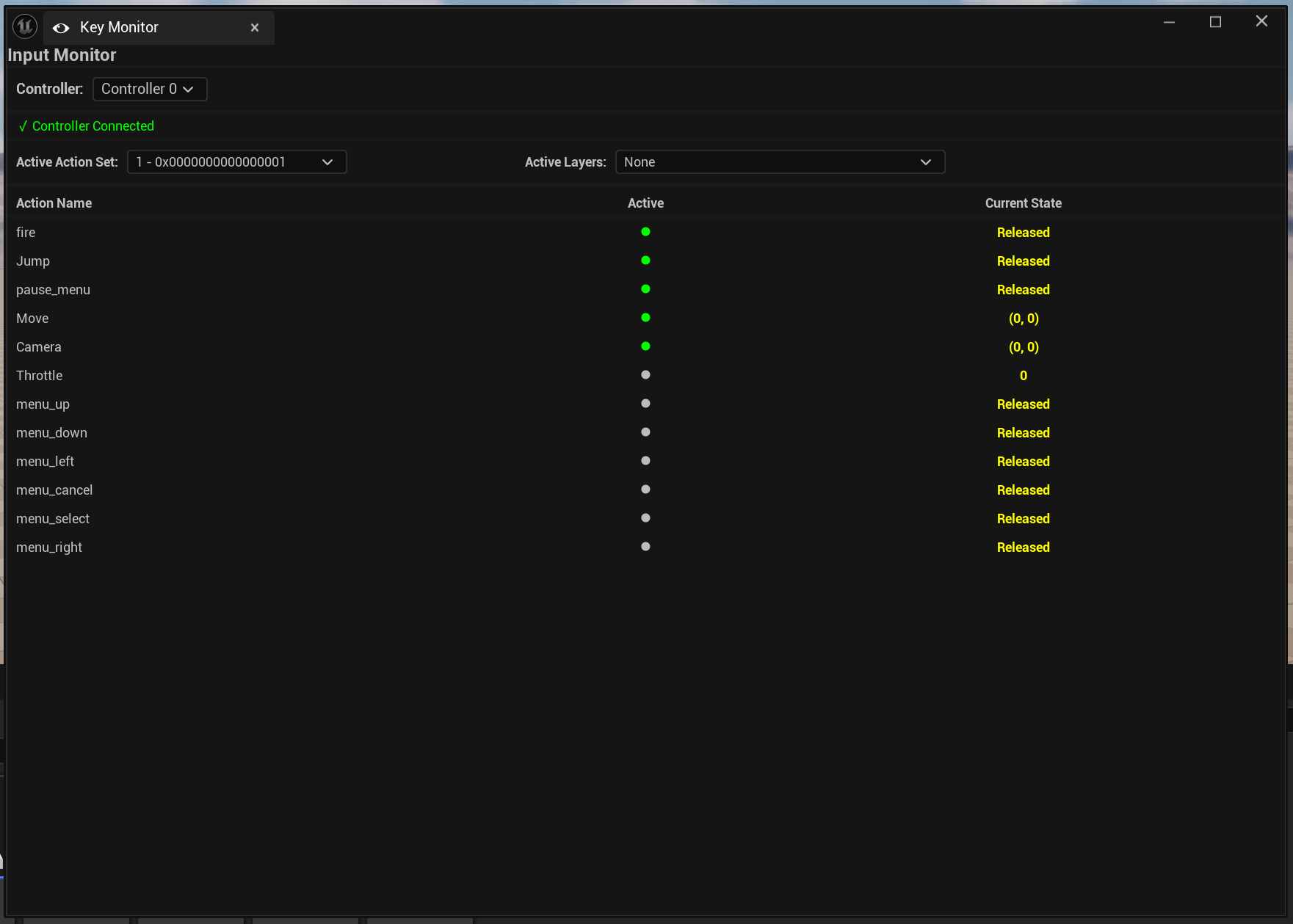
The final feature the plugin provides is a custom slate widget that can be easily customized, the widget will display the correct physical button on the controller to press based on the Input Action it is bound to. by default the default glyphs that steam provides are used for this but this can be easily changed in the plugin’s config page.
Current status
Currently the plugin is available for free on FAB, The features described are fully working and implemented. In the future the goal is to provide full support for the entirety of the SteamWorks API.